Posts

Showing posts with the label Hardware

LG BD 670 3D Wireless Network Blu-Ray Player Review

Image
Watch Product Reviews.com did a review on the new LG Blu-Ray player which I just bought.  The review includes a nice CNet video review at the bottom, so that you can see this great player in action.  With the ability to play movies, music and pictures from a USB flash drive or external hard drive, as well as streaming services like MLB.TV, Pandora, Netflix, YouTube, HuluPlus, Vudu and Picasa Web Albums and more all over wireless or wired network connections, this should be exactly what you're looking for in your next Blu-Ray player. 

Network Attached Storage (NAS) Options

Network Attached Storage (NAS) Reviews, Ratings & Comparisons The more tech people I talk to, the more it makes perfect sense to ditch my multiple external hard drives for NAS (network attached storage). PC Magazine does a nice job of comparing the many brands, sizes, formats, styles (capacity and physical size) and prices. This lengthy list will either confuse or help you make up your mind which type of NAS is best for you (maybe both).

LG BD390 Network Blu-Ray Player Review

Image
The Product of the Year: The LG BD390 Network Blu-Ray Player I have just bought what I feel is the Product of the Year. The reason why I say this is because all year I have been looking for a Blu-Ray player that does everything and plays everything. None have come close until this one. LG makes other Blu-Ray players, but this is the one with a Wi-Fi connection , and that is what makes all the difference. The Features So far I have not even tried using this Blu-Ray player to play Blu-Ray DVDs.  I have read many reviews that say this is one of the faster players around, loading and displaying DVDs quicker than almost any other player available.  But what I bought it for are the other features, which I have tested and can verify:  It has a built-in USB port on the front right side that allows you to plug in an external hard drive and play your DivX movies, MP3 music files, digital photos and a variety of other formats.   These media formats include f...

HarmonyOne Universal Remote

Image
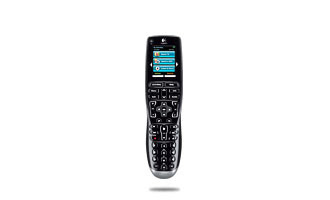
The Logitech HarmonyOne Advanced Universal Remote: The Ultimate Remote for the Living Room When asked whether a particular device, software program or computer is worth paying extra money for, I always respond the same way: how much is it worth to you? I was recently wondering what to ask Santa Claus for for Christmas. I have nearly everything in the way of technology I need . Then I looked at my favorite easy chair in the living room and discovered that I have 5 different remote controls! One for each different device connected to my home entertainment center. Fast forward a short time to when my wife was starting to review products for a Web site called BzzAgent.com . I don't know exactly how she did it, but somehow she was able to get my future Christmas present, a review copy of the new Logitech HarmonyOne Advanced Universal Remote to test and then write an online review of. I thought I would beat her to the punch, so I'm writing a review of it here. The reason I ask, ...

Tips and Tools for PC Building

Image
Tips and Tools for PC Building from If building PCs is a passion or an interest of yours, there is no better source than ExtremeTech.com. Their staff has the lowdown on what you need to know. From Pre-build Preparation to Software Tools to Post Assembly, this great article entitled " Tips and Tools for PC Building " will help you out. The article takes you through the steps, including recommended tools (like the Milwaukee 6546 Electric Screwdriver). For software tools, they recommend memtest86+ for initial boot testing and Bart's PE , the excellent Windows XP Live Boot CD. ExtremeTech.com is a site that is definitely for computer power users, but this particular article is for anyone with a thirst for taking computers apart and rebuilding them. The knowledge and experience here is outstanding, and this article is a terrific place to start if you're interested in building a PC of your own.

Practical Tech Accessories You Really Need

Image
A C C E S S O R I Z E Your Tech Let's face it. You don't really need a $500 iPhone or a $300-400 iPod , or even an $1,800 laptop that will fit inside of a manila envelope. Instead of spending all of your hard-earned money on the glitzy new tech toys that are out now, take care of what you already have first. Here are some recommendations, many of which are items you may not have thought about. These are the tech accessories you really need. USB to PS2 Adapter/Splitter : If you have a newer computer that has no little round ports (known as PS2 ports) in which to plug in your older mouse and keyboard, there is no need to buy a new keyboard and/or a new mouse. Instead, look for a USB to PS2 adapter. I found many of them on eBay for around $10.00. Then you can keep the mouse and keyboard that you've grown accustomed to and not have to replace them. This adapter can then be used on other computers in the future. Sometimes you can get them in sets of two. It's handy to hav...

Wireless Laptop Mice

Image
My Favorite Laptop Mice After three pretty exhaustive (and exhausting) posts in a row, it's time for a more simple and practical tip. People sometimes ask me, "What is the best mouse for laptop users?" Well, that really depends on what you're using it for. Are you just browsing the Web at home on your couch, or are you doing presentations in front of groups on a regular basis? There are many decent wireless laptop mice out there. But I basically only recommend about three types, and I prefer Microsoft in this category, although Targus and Logitech also make great mice across the board. The first type is for people in the first group. Those who just need a mouse for basic home use, and maybe some travel. If it is just going to be used as a mouse, and nothing more (not a presentation tool), then go with this one , the Microsoft Wireless Optical Mouse 3000 ($29.95) . It is small enough to work well with a laptop, yet comfortable, and its USB wireless receiver snaps ri...

An Update on USB Flash Drive Features

Image
The Best Features of the Newest USB Thumb/Flash/Pen/Key Drives Regardless of what you call them, today's USB thumb drives (aka: Flash drives, aka: Pen Drives, aka: Key drives) are all USB 2.0–ready and boast capacities as high as 32GB—with high prices to match. The sweet spot is 4GB. There you'll find reasonably priced USB flash drives with worthwhile extras and all the space you will need (at least for now). One of the two best uses of thumb drives today is for portable applications—software you can run from the drive without installing it to Windows. With portable apps, you can slip the equivalent of your entire PC into your pocket using any USB thumb drive, as long as you can find an actual PC to plug into. They're a great way to maintain privacy and sometimes even circumvent the rules. For example, your IT person might deny use of certain browsers or e-mail clients on a computer, but you can run them from the thumb drive (which stores the cookies and history for your po...