Posts

Showing posts with the label Training

Microsoft Office 2010 - Making the Transition from 2003 & Previous

To help you make the transition from an older version of Office to the current one, Office 2010, I have compiled these training resources.  Most of them are from Microsoft, but I also compiled a good one for Word based on what I've learned so far.  Let me know if you'd like to contribute any handouts to help teachers or anyone else making the transition from say 2003 to 2010, like my school district is doing.  It can be a quite traumatic experience.  Microsoft Office 2010 Training Links Microsoft Word 2010 Intro Training Microsoft's Office 2010 Training Site & Documents Getting Started with Office 2010 Learn Where Menu & Toolbar Commands are in Office 2010

Mark's Screencast.com Library

Image
In an effort to keep all new tutorial videos in one place, I have created a Screencast.com account and my Library is now posted .  It will be a work-in-progress, but this is where everything new will be stored.  Now you all have a link .  Feel free to request future "screencasts," and I will do my best to create them according to need.  Thanks to TechSmith for creating such wonderful tutorial-creation tools.  They just keep getting better.

Prezi: The Animated Presentation Creator

After attending this year's MACUL Technology Conference, one presentation tool stood out.  Prezi is a Web-based alternative to PowerPoint.  Yesterday I got a chance to create my first Prezi. As we all know, PowerPoint has been used in education for many years, but education was not its inteded use.  It was created to be used in business presentations.  Prezi has a format that is more user-friendly and (better yet) educational friendly.  You can easily create "Frames" which allow you to group like objects (text blocks as well as images) and when you're done, you can: Share the Prezi with someone else, allowing them to edit it or just watch it, Include a public Web link that can reside on your classroom Web site or blog, Embed the Prezi on your classroom Web site or blog (like I did below), Download the Prezi and show it without an Internet connection.  It can be stored on a DVD or USB Flash drive, for instance. Here is the public link to the Prezi below...

How to Use Multiple iPods with One Computer and iTunes

Image
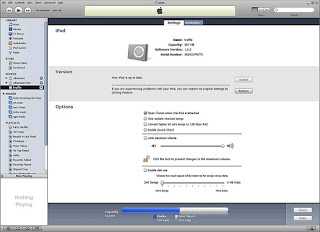
Here is one of the two most common questions I have been getting lately.  The other being "How to remove rogue security software from my computer."  I will cover that in a future article.  But first, how your kids can separate their vast music collections into their own personal libraries.  For instance, one kid might be a rap lover, while another kid might like boy bands.  Mom and Dad might prefer classic rock or oldies.  With this tip, you can keep them all separate without having to combine everything into one huge library. If you want to use more than one iPod with the same computer, you can.  In fact there are three different ways you can do it. 1st Method : If you share your computer with other people, you can maintain separate user accounts for each person who uses the computer.  This is useful especially if each user has different tastes in music; users can maintain separate, personalized iTunes music libraries a...

Microsoft Excel Training and Word 2007 Tutorial

Would You Like Quick, Free Excel & Word Tutorials? http://www.free-training-tutorial.com/ free-training-tutorial.com is a free website for learning and self-practicing all of the basics of Excel. Free Microsoft Word tutorial videos can also be found on the left menu. The site includes many tutorial videos and easy step-by-step manual instructions. Choose one of the subjects from the collection of buttons at the top of the site, and a list of relevant videos will appear. The videos are online, short and very easy to understand. These tutorials are created especially for beginners, but it's not just a collection of basic tips. After all, how many Excel users know how to use the VLOOKUP function? Not many. These free tips will show you how. http://www.free-training-tutorial.com/

Great Technology Resources for Adults Trying to Keep Up with Teens

There are many technology obstacles for adults over 50 trying to keep up with their kids and grand-kids who were raised with computers from their very birth. Here is a collection of resources that will help adults catch up with their kids and bridge the gap a bit better with regard to technology (in both skills and knowledge): 1) Understanding computers and Internet basics, spreadsheets, word processing, operating systems, etc. Training is free from the St. Clair County Library. For an updated schedule of classes, just download the latest issue of their newsletter. It is available at www.sccl.lib.mi.us/libnews.html -click on the latest issue of the newsletter. The Computer Training Schedule is in the Winter 2008-2009 issue on page 6. 2) Understanding the latest educational technology tools, such as interactive whiteboards, student responders (clickers), computer tips and shortcuts, building Web sites cheaply, using PowerPoint, and finding the best Web Sites for every occasion. Training...

Troubleshoot Microsoft Word Tables

Image
9 Great Tips for Troubleshooting Word Tables and Solving Your Headaches My policy has always been this. If you're having software problems, it is always best to get help directly from the source...whenever possible. So, today we have some excellent tips that should help solve your worst head-scratching issues with Microsoft Word tables . Visit this site for 9 excellent, specific Word table tips: http://office.microsoft.com/en-us/word/HP052567341033.aspx These tips deal with such common questions as "How do I stop my table column from resizing as I type?" or "How can I get my table to change size with my window?" or "My table snaps to the right or left when I try to move it. How can I make it stop?" These and six other dilemmas are answered directly by the Pros at Microsoft. This Troubleshoot Tables Web link is a definite keeper for anyone who has ever created a table in Word. Then, after you visit this site and solve your table problems, also direct ...

The GIMP: Tutorial Videos

Image
Learn The GIMP Online I have looked high and low over the years for an exceptional set of video tutorials for The GIMP. If you've ever tried to learn how to use The GIMP, you know it has a steep learning curve to say the least. It is like Photoshop in that it is a very powerful professional-level photo manipulation tool. However, if you don't have a way to learn it in a hurry, you may be sitting at your computer struggling with it for quite a while, not getting anything done. Finally, I have found two different sets of tutorials to help us learn this wonderful but complicated open-source application. The first one is from AtomicLearning.com and requires the standard $99.99-per-year subscription to the AtomicLearning online video tutorial library. Other free or open-source software included among Atomic's tutorial collection are Audacity (which I did), NVU (the HTML editor) and the entire OpenOffice suite. Again, this requires a $100 subscription per year. The total number o...

Commonly Used Acronyms Online & on Cell Phones

Image
Acronyms & Glossary NetLingo.com Top 20 Internet Acronyms Every Parent Needs to Know Nothing is more humbling for a parent than seeing a list like the one below. And, nothing is more helpful to a parent than seeing a list like the one below. Armed with this resource, you suddenly understand a lot of what your kids are talking about online in chat rooms, instant messaging programs, or in cell phone text messages. It's very disturbing and very real. The fact is, they don't want you to see this list. Understanding this reality is a great start to becoming more aware. For a comprehensive acronym list, check out http://www.netlingo.com/emailsh.cfm . Also, for parents concerned about their kids' online safety, check out these helpful links from WebWiseKids.org : http://www.webwisekids.org/index.asp?page=helpfulLinks The NetLingo Top 20 Acronyms POS - Parent Over Shoulder PIR - Parent In Room P911 - Parent Alert PAW - Parents Are Watching PAL - Parents Are Listening ...

Paul Thurrott's SuperSite for Windows

Image
Paul Thurrott's SuperSite for Windows is dedicated to providing all of the information Windows users need to evaluate important upcoming technologies, including Microsoft Windows, Microsoft Office, Xbox 360, plus related digital media, Internet, home networking and more from Microsoft and its competitors. This Web site provides continuous updates about these future products and technologies, while offering reviews, technology showcases, FAQs and other articles all designed to give you the information you need to decide which upcoming technologies are right for you. Anything that works with or competes with Windows will make an appearance on this site. But wait, there's more here. As a site venture, Paul also collaborates on a podcast with Leo Laporte (formerly of Tech TV) called Windows Weekly . This podcast started in September 2006 and continues to this day. On Paul's SuperSite for Windows, you will find reviews of the various components of Windows Vista, and when W...

Free PC Maintenance & Security Workshop

Image
Mark's "PC Maintenance & Security" Video Series Here is the Web link to the best class I have ever put together: http://movies.atomiclearning.com/k12/pc_cleansecure I recorded this video training series two summers ago, and it has been well received across the country. An AtomicLearning.com membership is $100 per year, but you can view ALL of AtomicLearning's content for free for the next 14 days if you request a 14-day demo account. To do this, just fill out the form on one of the free course outline pages, or off of the Home page. There are a lot of great online software training sites available now. Total Training, Lynda.com, CBT Nuggets and VTC are other great names. All cost about the same for a yearly membership (around $300), but AtomicLearning has a few advantages over these sites. First, it is geared toward teachers. AtomicLearning is the only site that offers "Lesson Accelerators," which are pre-designed lessons which are geared toward learnin...

Excel Tips: Sites and Add-ins

Image
Excel Tips and Add-ins Galore The Excel users in the crowd have been overlooked in this blog until now. I am compiling some tips to help you through your work day a little more efficiently, with some help from our friends over at TechRepublic.com , who seem to always have the best tips for business software users. To receive the following downloads, you first need to register, but don't worry. TechRepublic.com's site registration is free, and well worth it. So do that first. Then log in to the site. Now, the first of two very useful links. The first is their list of " 75 Essential Excel Tips ": http://tinyurl.com/5tbztc These tips have been compiled by their staff of talented Excel users. This 30-page document covers techniques for Excel 97-2003, featuring time-saving tricks that range from data entry and cell formatting to currency conversion and workbook sharing. But wait, there's more... Some of my personal favorite Excel tips appear on this site: http://www.j-...

Tips and Tools for PC Building

Image
Tips and Tools for PC Building from If building PCs is a passion or an interest of yours, there is no better source than ExtremeTech.com. Their staff has the lowdown on what you need to know. From Pre-build Preparation to Software Tools to Post Assembly, this great article entitled " Tips and Tools for PC Building " will help you out. The article takes you through the steps, including recommended tools (like the Milwaukee 6546 Electric Screwdriver). For software tools, they recommend memtest86+ for initial boot testing and Bart's PE , the excellent Windows XP Live Boot CD. ExtremeTech.com is a site that is definitely for computer power users, but this particular article is for anyone with a thirst for taking computers apart and rebuilding them. The knowledge and experience here is outstanding, and this article is a terrific place to start if you're interested in building a PC of your own.

Celebrating Freeware and Great Tech Forums

Image
Celebrating Freeware and Great Tech Forums ( http://www.bleepingcomputer.com/forums/topic3616.html ) and ( http://www.techsupportalert.com/best_free_tech_support_sites.htm ) I recently stumbled onto a great forum post on bleepingcomputer .com/ that gives a very comprehensive list of freeware replacements for common commercial applications . These commercial products are some of the biggest names in software, but the challenge of coming up with great freeware that will meet most the same needs was met quite well. It was truly a beneficial topic for everyone, which brings up the point I want to make. I have learned more from the various online tech forums in the past year than from almost any other type of computer training. These forums are seemingly everywhere, but they generate the kind of wonderful exchange of experience and ideas that we need in the technology field. For instance, if you had a strange computer problem (like a cryptic Windows error message) that you could not fix y...

529 Tips for Better Computing

Image
You read it right...529 Tips ( http://snipurl.com/2672t ) All right. This is it. If this comprehensive list of computer tips doesn't answer and solve your recent, current, and future tech questions/problems, nothing will. At least for now. PC Magazine published this article on their site, and I'm posting it here, just in case you missed it. Leading off in a very worthy place, the Windows Vista operating system, this compendium of tips tackles hardware as well as software (even Excel, PowerPoint and Word are covered) and business. With hundreds of tips in each section by the magagazine's analysts and editors, they have really outdone themselves here. Included are hacks, add-ons, advice, how-tos. This collection of tips will take a while to wade through, but it's well worth it. Here is a tip for you. Click on the links at the left of the site to jump directly to any particular section in the 529. Then you don't have to tirelessly click on the arrows at the bottom of e...

Adobe Acrobat Pro 8 Tutorial by Leslie Fisher

Image
One of the most entertaining and informative technology trainers working today is Leslie Fisher. If you have not seen one of her one-hour sessions at Michigan's MACUL conference, or any other tech conference for that matter, then you really should seek her out. And if you don't get a chance to see her perform, then you can stop by her Web site: http://www.lesliefisher.com/ Leslie is truly one of the most engaging tech people wandering around the planet today, and she really knows her stuff. She is one of those rare people who could be considered an expert in her field. Specializing in training sessions on Adobe and Apple products, she has gained quite a following as a speaker, after appearing in some of the bigger tech conferences in the country. Her dynamic sessions for the past several years on the capabilities of Adobe Acrobat 8 Professional have been a great draw at MACUL . Here is the page where you can download her handout from that session: http://www.lesliefisher.com/...

Layers Magazine Tutorials

Image
If you're looking for the online how-to magazine for everything Adobe, here is the site: http://www.layersmagazine.com/ . Every day, you will find reviews, contests, a blog, articles and Creative Suite tutorials added to the site. Just click on the program you want, such as Illustrator, Photoshop, Flash, AfterEffects, Dreamweaver, etc. There are icons at the top for each of the big Adobe applications. Clicking on any one of them will bring up tips and tutorials for that program. For a more comprehensive collection of tutorials, click on either the " Tutorials " link on the top navigation bar, or click on the "Tutorial Center" link at the very top of the site. You can subscribe to the site (to obtain the latest updates) by clicking on the RSS feed link on any page. There is a tremendous amount of free content on this site, but if you prefer to subscribe to the newsstand magazine subscription, a one-year subscription costs $30.00 or $50.00 for two years. The full ...

Dave's Site and HTML Tutorial

Image
HTML: An Interactive Tutorial for Beginners (Just Part of Dave's Site) People who are serious about creating Web sites often put the cart before the horse and learn WYSIWYG programs like Dreamweaver, FrontPage, GoLive, etc. But where they really should start is with HTML programming. They should learn the basics of HTML code, so they can at least understand how it works. It helps to know some HTML, especially when problems arise. This way you can figure out how to fix some of those problems. It's kind of like knowing a little bit of Spanish or a little bit of French. You never know when you'll need it - to help get you out of a jam. Inspirational cancer survivor Dave Kristula owns and runs Dave's Site ( http://www.davesite.com ), which has some excellent Interactive Tutorials (as he calls them) for such topics as CSS, Web Site Design, and the Internet in general ( Dave's Beginners Guide to the Internet ). But the overall highlight of the site for many people is ...

Janine Warner's Tutorials

Image
Janine Warner and Her Digital Family of Tutorials Since I do computer training for a liviing, I really marvel when I find others who do the same thing, but who train in areas that I have yet to learn, or who have skills that I aspire to. Trainers who have reached standout status. Authors, high-paid conference speakers, etc. I could list some of my favorites: Leslie Fisher, Patrick Crispen, Deke McClelland, Colin Smith and Scott Kelby. The list goes on, but these are some of my mentors, even though they don't know me personally. Recently I glimpsed some of the training titles available from the exceptional Total Training collection by Janine Warner . I was immediately intrigued by her smooth, knowledgable demeanor and excellent, calming vocal delivery. She's easy on the eyes, too :-) Janine is a master of all things Web: from Dreamweaver (she's the author of the best-selling Dreamweaver for Dummies and Web Sites for Dummies books) to tackling the daunting task of creatin...